
Best Smart Home Devices for Apartments in 2026 – A Practical Guide
Smart home

Introduction

The experience of living in an apartment in 2026 is a challenge all on its own. This is a dilemma that most renters encounter at some point: You want the luxury of a home from the future, but you can’t drill holes in things, rewire the walls or alter faucets. For years, “Smart Homes” literally meant pricy, permanent construction.

However, the landscape has shifted. Today temporary smart solutions are the urban living standard. Whether you are in a cozy studio or a high-rise flat, though, you can now enjoy all the comforts of a fully automated lifestyle that moves with you when your lease is up. So to help you out, we’ve put together this practical guide with 10 devices you can use that will provide maximum impact with zero permanent damage.

Why Smart Tech is a Small Space Game-Changer

In a small square-footage environment, efficiency is key. Smart technology in 2026 isn’t a “look what I can do” scenario; it’s solving small-space problems. From auto-dimming lights that create a “theater feel” in a one-room apartment to smart sensors that manage your climate while you’re out of the house, these gadgets help maximize your comfort. By automating repetitive tasks you translate a small apartment into a larger, more organized and more premium experience.

The Renter’s Rule: Look for “Plug-and-Play” Gadgets

The first rule of smart apartment living is reversibility. If a device needs a professional electrician or requires a drill that makes notches in the wall, it’s probably not for you. Giga/Swash, Aegis and Graviton are all preparing for the 2026 iteration of the “Plug-and-Play” revolution: devices with adhesive strips, battery power or plain sockets. This guide prioritizes gadgets you can install in five minutes and uninstall even faster, so that all of your security deposit comes back and you get to enjoy the best this side of the 21st century has to offer.

10 Best Satisfying Bedroom Gadgets

Out of the Box Smart Security Solutions (No Drilling Necessary)

Security is paramount to any resident, but those who live in apartment structures frequently contend with stringent “no-alteration” policies. Fortunately, the smart home industry has mastered drilling-free security hardware by 2026. These devices offer peace of mind as well as high-tech protection, all while being completely portable and easy to take down once you leave.

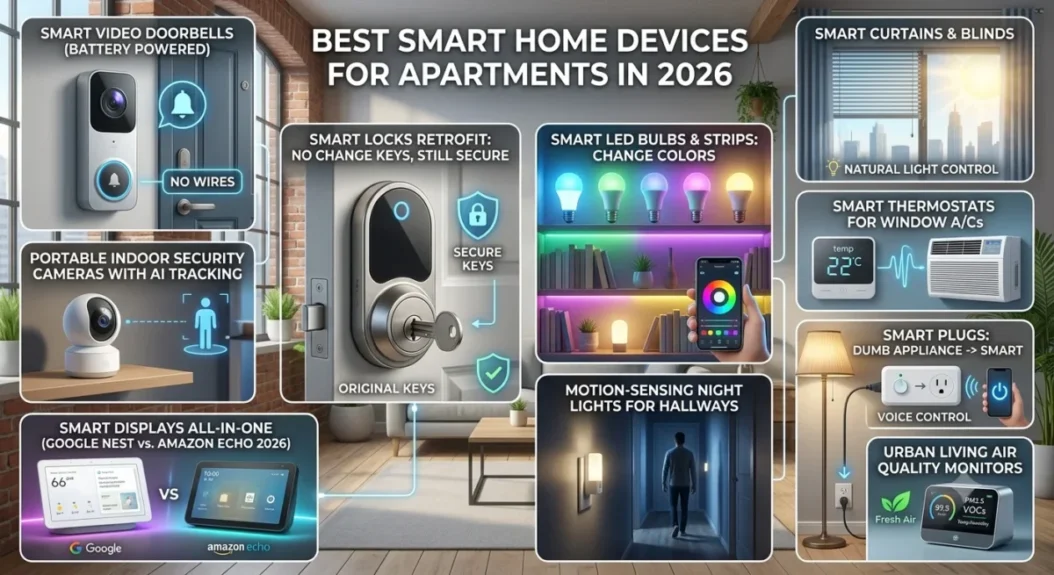
1. Smart Video Doorbells (Battery Powered)

Video doorbells used to be difficult and messy — with wiring and drilling into the door frame. Now battery-powered models are the smart home solution of last resort for renters. They can be mounted via high-strength, weather-resistant adhesive brackets, or “over-the-door” mounts that slide over your door’s edge. They are able to dispenses with 2K resolution and two-way audio, so you can talk to delivery drivers or scare off intruders straight from your phone without leaving a single impression on the hotel’s exterior.

smart home

2. Portable Indoor Security Cameras with AI Tracking

Portable indoor cameras are critical if you would like to monitor your pets or anything in the home. Unlike older models that had to be bolted up onto the ceiling, 2026’s best smart home cameras are sleek, freestanding machines that sit atop any shelf or bookshelf. These cameras feature advanced AI tracking and even know to differentiate between a human and the family pet, providing you with instant alerts when something’s not right. The best part is they just plug into a standard wall outlet, making ’em 100% renter-friendly.

3. Smart Locks Retrofit: No need to change the keys and still secure

Landlords typically prohibit residents from changing the physical locks on their doors. The “retrofit” technology does just that by attaching to the interior of your existing deadbolt. You retain your original keys and the exterior of the door looks exactly the same, yet you get all the smart-home benefits. You can unlock your door via Bluetooth, send digital “guest keys” to friends, and even have the door lock automatically behind you — all without so much as touching a drill or a screwdriver.

Lighting and Ambience: Creating the Perfect Mood

The best way to alter the “vibe” of a small apartment without purchasing new furniture, is lighting. A carefully organized smart home lighting design can help make a small studio feel airy and bright during the day, but cozy and intimate at night. The best part for renters? Many of these solutions either replace your existing bulbs or attach to surfaces via adhesive, so they’re the ultimate in space-saving upgrades.

4. Smart LED Bulbs & Strips: Change Colors with a Click

One of the easiest ways to step into the smart home is with a smart bulb. By replacing your standard “yellow” bulbs with Wi-Fi-enabled LED versions, you’re able to control millions of colors and dimming levels. You can stick LED light strips behind the TV or under kitchen cabinets, creating high-end “accent lighting” if you need it — for apartments, this is a game changer. Now, these strips are thinner and brighter than ever, letting you hide them in narrow gaps to make your apartment look like a high-end hotel — in 2026.

5. Motion-Sensing Night Lights for Hallways

In smaller apartments, kicking around a dark kitchen searching for a light switch can be daft. The best smart home upgrade: battery-operated, motion-sensing night lights These little gadgets can be attached to the baseboards of your hallway or bathroom with 3M command strips. They switch on only to movement, ushering you with a soft and subtle light that won’t rouse you into consciousness or require permanent electrical work.

6. Smart Curtains & Blinds for Natural Light Control

Sunlight is a scarcity in urban apartments. The smart curtain robots are “retrofit” devices that hook onto your existing curtain rod or track. They convert your ordinary curtains into a smart home feature that opens at sunrise, closes at sunset. This automatic system also helps you keep your sleep cycle in check, while giving you an added layer of privacy and thermal protection — meaning that your apartment remains cool in the summer and warm in the winter with absolutely no effort from your end.

Smart Gadgets to Control Climate and Energy Use

The utility bill is one of the biggest hidden costs of living in an apartment, particularly in older buildings with inefficient cooling. Converting your space into a smart home doesn’t just create convenience; it is a strategic maneuver to reduce your energy consumption in 2026. These devices enable you to manage your environment more accurately, ensuring you’re only paying for what you use.

 Smart Home Devices_ AI smart Speaker

7. Smart Thermostats for Window A/Cs

Many don’t even allow you to change the central thermostat, and many have window or portable AC units. Smart AC controllers serve as a smart home bridge in 2026. These devices use infrared technology to communicate with your “dumb” AC unit, enabling you to set schedules, adjust the temperature via cellphone and even switch off the cooling using geofencing when you aren’t in the apartment. It’s the simplest way to achieve central-air comfort on a renter’s budget.

8. Smart Plugs: Making a Dumb Appliance Smart

If you own a floor lamp, a coffee maker or even a fan that won’t connect to Wi-Fi natively, then the smart plug will become your best friend. These small adapters are the foundation of any smart home ecosystem. If you plug your appliance into a smart plug, you’ll be able to monitor how much energy it’s drawing in real-time and set “auto-off” timers. It stops “vampire power” suck from electronics that remain plugged in, letting you save a sizable amount on your monthly utility bill.

Smart home

9. Urban Living Air Quality Monitors

By 2026, city-dwelling apartment dwellers are even more alarmed at pollutants indoors and CO2 levels. A specialized air quality monitor is a super-easy smart home sensor that measures dust, allergens, and humidity. You can then link these devices to your smart air purifier, so that the second the air quality starts to deteriorate in your home — maybe while you’re cooking or due to smog in a city — your air purifier automatically turns on. It’s a health investment that requires zero installation, other than plugging it into a wall.

The Brain Behind it All: Your Apartment Command Center

Controlling ten separate gadgets through ten disparate apps is not a smart home — it’s a headache. To take advantage of the automation in a small apartment, you need some sort of central “brain” to daisy chain everything together. By 2026, central hub no longer means speaker; it’s now your visual and command center to all those scattered pack mates in each corner of your home as you tighten up everything into one interface.

10. Smart Displays All-in-One (Google Nest vs. Amazon Echo 2026)

A high-quality smart display should be the heart of your smart home. The showdown between the Google Nest Hub and Amazon Echo Show reaches a perfect pitch in 2026. These displays serve as a digital dashboard for your apartment. You can view your video doorbell feed, adjust your bedroom lighting or check your air quality monitor with just a tap or voice command. These are great for apartment dwellers because they sit on a counter or nightstand, need zero mounting and make it easy for everyone in the home to control the tech.

Enhanced Compatibility With Matter, Both Devices Speak One Language

If you’re planning a smart home for the future and want it to be “future-proof” you need to look out for the “Matter” logo on every device you purchase. Matter is the new universal language that lets disparate brands communicate with each other. Previously, you had to worry about whether or not a lightbulb was compatible with “Hey Google” or “Alexa.” Matter-compatible devices will work across all platforms in 2026. This is particularly important for renters, who may initially install one system but then move to an apartment that prefers another. Matter future-proofs your smart technology investments, so they can continue working and connecting regardless of the ecosystem you choose.

FAQs – Smart Home Devices for Apartments/Flat

Does setting up a smart home violate my rental agreement?

n 99% of cases, no. So long as you stick to “plug-and-play” or adhesive-based devices, which do not involve drilling into walls or changing electrical wiring, you would not be violating standard lease terms. Always favor gadgets that are described as “renter friendly” or “non-permanent.”

Do I need fast internet for all these devices?

Yes. A Wi-Fi connection is the backbone of a stable smart home ecosystem. Since gadgets such as security cameras and smart displays stream data, we recommend at least a 100 Mbps connection to make sure your devices respond in a flash instead of after an awkward pause.

What will happen to my smart home setup if I move?

That is the magic of the 2026 apartment guide! Because our focus was portable devices, you’d just unplug from your hub, pull off the adhesive-backed sensors and throw `em in a box. When you get to your new place, you just plug them in, and your settings will be exactly the same.

Can my landlord “hack” into my smart home devices?

Security is a valid concern. Be sure to enable two-factor authentication (2FA) on your smart home apps to block unwanted access. You can feel secure that your data and camera feeds remain private to you, as long as you’re only accessing it from your own private Wi-Fi network (not the building’s “guest Wi-Fi”.

How much does it cost to set up a smart home in 2026?

Not at all. You don’t need to purchase all 10 of the devices at once. You could begin with a basic smart bulb or a smart plug for less than $20. The most cost-effective method is building your ecosystem gradually, in which you add one new device only monthly.

Final Verdict: How to Build Your Smart Apartment on a Budget

In 2026, making a rental a fully functioning smart home isn’t some faraway pipe dream for only homeowners and those with endless deep pockets. The beauty of modern technology is that it is modular. You don’t need to pay thousands of dollars upfront to have a connected lifestyle. The best (and cheapest) way to build your ecosystem is to find pain points — those daily tasks that make you angrier than they probably should and one device at a time solve them.

Here is a step-by-step implementation to stay on budget:

  • Month 1: Start with the Brain (A Smart Display or Hub)
  • Month 2: Atmosphere (Smart bulbs and plugs for high-use areas)
  • Month 3: Add “Security” (A battery-powered Doorbell or Indoor camera).

A high-end smart home experience, without the financial pinch — and all 100 percent portable for your next move.

Best Overall Apartment Owner for Beginners

When in doubt, and if you are truly just closing the tunnel fillers with no clue, our #1 recommendation is the Smart Plug. It is the cheapest entry point into the smart home. For the price of less than a takeout meal, a smart plug lets you have some automation taste by being able to schedule your old lamps or coffee makers — without any technical stuff needed. Once you get used to having your morning coffee scheduled from your phone, you’ll realize why this is a switch that millions of apartment dwellers are making in 2026.

Top 5 Best Smart Home Security Gadgets

Best Smart Home Security Gadgets

In the world of today, nothing is more valuable than security. Is your mind always on the safety of your residence when you are out for job or travelling? This is a familiar issue for homeowners that can be solved with Smart Home Security Gadgets. Technology is such a wonderful thing, and it’s now more convenient than ever to keep an eye on your home while you’re half way around the world armed with only your smartphone.

You can get rid of worry, and ensure your family’s safety 24/7 — by investing in the best smart Gadgets. Our list of the best covers those gadgets that nicely balance newness with security.

Why You Need Smart Security Gadgets Now

Conventional locks, in other words, are no match for contemporary intruders. Smart gadgets offer preventative security. Instead of just capturing a break-in, these cameras can let you know as soon as someone sets foot on your stoop.

Artificial Intelligence (AI) for the capacity to differentiate between stray cat and a real human. This cuts down on false alarms and means that, when your phone rings, it’s worth bothering with. And some newer systems, thanks to features like two-way audio, offer a level of defense that older systems just can’t match.

Top 5 Smart Security Products List

1. Arlo pro 5S 2K spotligt Camera-Best Security Gadget

Out of many best modern Security Gadgets Arlo Pro 5S is a powerhouse with clear 2K HDR video. True-to-life resolutions guarantee maximum precision when zooming in on faces or license plates — no detail would ever go by unnoticed. It has dual-band Wi-Fi for an ultra-strong and reliable connection, crucial in a household that’s regularly live streaming. One of its best features is its integrated spotlight, which allows it to capture color night footage rather than the blurry darkness that makes for less useful video evidence.

It is one of the smartest Security Gadget other than camera quality. The AI makes an accurate distinction between people, animals and vehicles, eliminating pesky false alarms. It also includes two-way audio and a built-in siren, so you can help drive away intruders from your phone. Offering a high-end, professional approach to surveillance within an easily installable wire-free and weather-resistant body, making it the ideal security camera for any home owner.

 Arlo Pro 5S 2K Spotlight Camera Security Gadgets

2. Ring Video Doorbell Pro 2 – Top Smart Security

The Ring Video Doorbell Pro 2 is among the best rated Security Gadgets for front door guarding. It provides “Head-to-Toe” HD+ video, which captures your entire porch, including packages on the ground. The most powerful innovation is the 3D Motion Detection, which can accurately monitor the distance and timing of an event through radar, resulting in alerts being much more accurate than for traditional sensors.

As if that wasn’t enough, it also boasts “Bird’s Eye View,” which catalogs a visitor’s path across your premises for comprehensive awareness. One of the biggest changes for Security Gadgets is this doorbell which nonetheless a must-have luxury, fits all smart home systems including Alexa. It ensures you are always in charge of your introbution with feature such as noise-cancelling two-way talk and automated greetings, giving you peace of mind 24/7 via a sleek, hardwired device.

Ring Videos Doorbell Smart Security Gadgets

3. August Wi-Fi Smart Lock – Home Security Essential

The August Wi-Fi Smart Lock is the most premium selection on our Security Gadgets list for its ability to upgrade your door without replacing what’s already there. It slips over your existing deadbolt on the inside of the door, so you can still use your traditional keys as a backup. And computers wi-fi enable you to lock or unlock your door remotely from anywhere with your smartphone. Special to this gadget is also the “Auto-Unlock” feature which employs geofencing technology to know when you arrive so it opens itself as you approach, allowing a seamless and hands-free entry.

It’s all about safety and control with this device. To best protect your home at all times, it also lets you give guests or service providers “Virtual Keys” (with time windows set). The DoorSense technology even alerts you if the door is ajar, so its one of the most reliable Security Gadgets that ensures your safety. Whether you rent or own, this smart lock adds a level of modern digital protection to your front door, making your day-to-day much safer and more convenient.

August Wi-Fi Smart lock Security Gadgets

4. Google Nest Cam – Smart Surveillance Gadget

TWith its intelligent A.I and stylish form factor, the Google Nest Cam is a stand-out in Security Gadgets. With 2K HDR video and a wide 152-degree field of view, it ensures that you can see every detail of your property in high def. The most impressive feature, however, is something called “Familiar Face” technology that can tell the difference between family members and strangers, texting you alerts that are actually relevant. It’s supposed to be clever enough not to sound false alarms — such as trees rustling in the wind, only then responding only when security events have occurred.

This camera’s integration is where it really shines as one of the best Security Gadgets. It works seamlessly with their Google Home ecosystem, where you can view live feeds on smart displays in your house or cast them to your TV. It has 24/7 live view with two-way audio so you can check out what is happening in your home and converse with guests. The Nest Cam makes for a highly robust and brainy surveillance mechanism in 2026, thanks to its weatherproof construction that keeps it safe for both indoor and outdoor usage along with the encrypted video storage which guarantees safety and security always.

Google nest Cam Security Gadgets

5.Wyze Cam v4 – Affordable Home Security Device

The Wyze Cam v4 is one of the most gratifying Security Gadgets for people on a budget if you want high-end features at an incredible price. Its small design, but provides breathtaking 2.5K resolution and colorful night vision, also enables you to see in complete darkness. To actively deter intruders, the camera is equipped with a motion-activated spotlight and 99dB loud sirene. Its magnetic base and compact cube design make it extremely easy to install on almost any surface — inside your living room or outside your garage.

The Wyze Cam v4 demonstrates how Security Gadgets don’t need to be costly. Since it also supports local storage through a microSD card, you can record all day, every day without paying for any monthly subscription fees. It uses AI person/pet detection to notify you instantaneously on your mobile device of relevant activity. Compatible with both Alexa and Google Assistant, it is the perfect addition to any modern smart home. If you’re just getting off the ground with home protection this camera strikes a great mix between cost, toughness and high tech features.

Wyze Cam v4 Security Gadgets
Wireless home security (gadgets)surveillance camera

Pros & Cons Of Each Product

1.Arlo Pro 5S 2K Spotlight Camera

Arlo Pro 5S is the way to go for security writing on visual evidence and connectivity.

Pros:* Dual-band Wi-Fi: Enables usage of both 2.4GHz and 5GHz, leading to more stable connection as well as quicker loading times for videos.

  • Gorgeous 2 K Video: The high-resolution sensors allow you to shoot at the 12x digital zoom without losing as much detail.
  • Integrated Spotlight: Enables color night vision and serves as a strong deterrent, alerting would-be intruders.

Pros: * Subscription Required: Most advanced features and cloud storage require a monthly Arlo Secure plan.

  • Inital Requirments : One of the pricier standalone Security Gadgets available.

2.Ring Video Doorbell Pro 2

This is the best front-door sentry for homes with existing doorbell wiring.

Pros: * 3D Motion Detection: Uses radar to only notify you when someone crosses a certain distance threshold.

  • Ankle-to-Angle View: The 1:1 aspect ratio means you can see visitors’ faces and packages left at the base of your door.
  • Bird’s Eye View: A bird’s eye map of the path a visitor traveled on your premises.

Pros: * Hardwired Only: Functioning on existing doorbell wiring, like a traditional setup, this is not battery powered and may pose installation challenges for beginners

  • Less Ecosystem: The best experience is in the Amazon Alexa ecosystem; weak integration with Google Home.

3.August Wi-Fi Smart Lock

Great for renters or homeowners who want to maintain their outdoor aesthetics but infuse smart tech.

Pros: * Retrofit Design: It mounts over your existing deadbolt, so you can keep your original keys and exterior hardware.

  • Auto-Unlock/Lock: Employs geofencing to unlock the door while you’re walking towards it and lock immediately after you close it.
  • Bridge No More: With Wi-Fi built-in, no extra hub is needed to connect it to your router.

Pros: * Consumes less power: Uses Wi-Fi which decimates the battery life, but less than Bluetooth-only models.

  • Bulkier Interior (twice as big): At 5 by 3 inches (though not all of that sticks out above) it is noticeably larger than some other smart locks, and may slide resistance on minimal doors.

Smart Security Gadgets Setup and Use Guide

You don’t need a professional to install high-tech security anymore. Here are four thorough steps how to get your house protected in minutes

Step 1 : Unboxing And Getting Started

If you plan to mount something, make sure the device is ready for digital setup.

  • Inventory Check: The first step is to open the box and make sure that all of the components (batteries, mounting brackets, screws) are there.
  • First Charge for Wireless Security Gadgets In the case of the Arlo Pro 5S or Wyze Cam, connect them to a power source. To avoid removing them after, it is better to get a 100% charge before installation.
  • App Preparation: The first step you want to do is go to the Apple App Store or Google Play Store while your device is charging. It will also be necessary to download the official app (for instance, Ring, Arlo Secure, or Google Home).

Dereferenced characters and wifi

This is the “brain” of your security system.

  • Register an account: Launch the app and register securely. Enable Two-Factor Authentication (2FA) for added security.
  • The QR Scan: Most modern Security Gadgets feature a QR code on the back or bottom. Open the app, scan this code — it will automatically find your device.
  • Network: Enter your Wi-Fi password.
  • Tip: For devices with poor coverage, stick to a 2.4GHz network, unless the device is designed for an exclusive 5Ghz (as in Arlo pro 5s) faster data

Strategic Physical Installation

Avoiding blind spotsImportant to avoid false alarms.

  • Height & Angle: Ideally install cameras 7 to 9 feet high. That should be high enough to stay out of reach but low enough to still catch clear details on the face.
  • To Minimize Glare: Don’t face the lens straight toward the sun or high-contrast light sources, as that will wash out your video.
  • Signal Strength: Do a dry run. Before you grab the drill, hold the device in position and see it on “Live View” of your phone if Wi-Fi is strong.

Step 4: Setting Smart Alerts and Zones

Then get fine-tuning: set the gadget so that it works for you.

  • Activity Zones: Use the app to create “Zones.” For instance, tell the camera to ignore the street (where cars drive) and alert you when someone steps onto your driveway.
  • Sensitivity Settings: Change the motion sensitivity. If you have pets, adjust the sensitivity so a cat doesn’t set off a “Human Detected” notification at 3 A.M.
  • Shared Access: Invite family members to the app so they can also keep track of the house and get emergency alerts.

Quick Maintenance Tip:

Use a microfiber cloth to non-gently wipe the lenses of any Security Gadgets once a month, and check for firmware updates in the app so you can have security patches from your device manufacture.

What are the advantages of smart security gadgets?

Smart Security Gadgets provide real-time tracking and instant notifications that conventional locks lack. They enable you to see, hear and talk to everyone on your property from anywhere in the world through your smartphone. These devices are not just used to record a crime but have features like AI motion detection and cloud recording which help in deterring the criminals beforehand.

Are all Security Gadgets charged monthly?

Not necessarily. While many high-end Security Gadgets such as Arlo and Ring fleece you for cloud storageage on a monthly basis — in addition to other AI features — certain brands (oogle at you, Wyze and Eufy) give you the option of storing footage locally on a microSD card. That means you can still have all that good surveillance without the monthly fees.

Will these Security Gadgets run in the power cut?

In the event of a power outage, battery-powered Security Gadgets will still record and detect motion. But because they use Wi-Fi to send alerts to your phone, you’d have to use a backup power source (such as a UPS) for your internet router in order to get real-time notifications during a blackout.

Is it hard to install Smart Security Gadgets by myself?

Most of the New security gadgets are DIY (Do-It-Yourself) able. Wireless cameras and smart locks typically take just a screwdriver and 15–20 minutes. Most apps support step-by-step video tutorials that lead you through the syncing and mounting process, eliminating the need for a pro in most homeowners’ cases.

How can I avoid getting my Security Gadgets hacked?

You can secure your Security Gadgets by using unique, strong passwords during account setup and enabling 2FA (Two-Factor Authentication). And do keep your device firmware up to date via the app so you have the latest security patches against potential cyber threats.

Conclusion: Final Verdict

Fast forward to 2026: securing your home transcends mere heavy doors and physical locks — it’s about having the right Security Gadgets that align into an impregnable digital citadel. Whether you’re at work or vacationing around the world, knowing you can check your front door or lock up your house with a single tap is priceless. The technology has evolved to the point where even the most technically challenged can turn their residence into a futuristic oasis without hiring anyone.

If you want the very best of the best, we recommend the Arlo Pro 5S for awesome video clarity and powerful AI. But for those embarking on a cheap smart home security project, the Wyze Cam v4 is astonishing value for money. At the end of the day, the best Security Gadgets are those that complement your lifestyle and home setup. Do not wait for an emergency to happen — secure your home today and have the peace in mind that your family is safe at all times.